
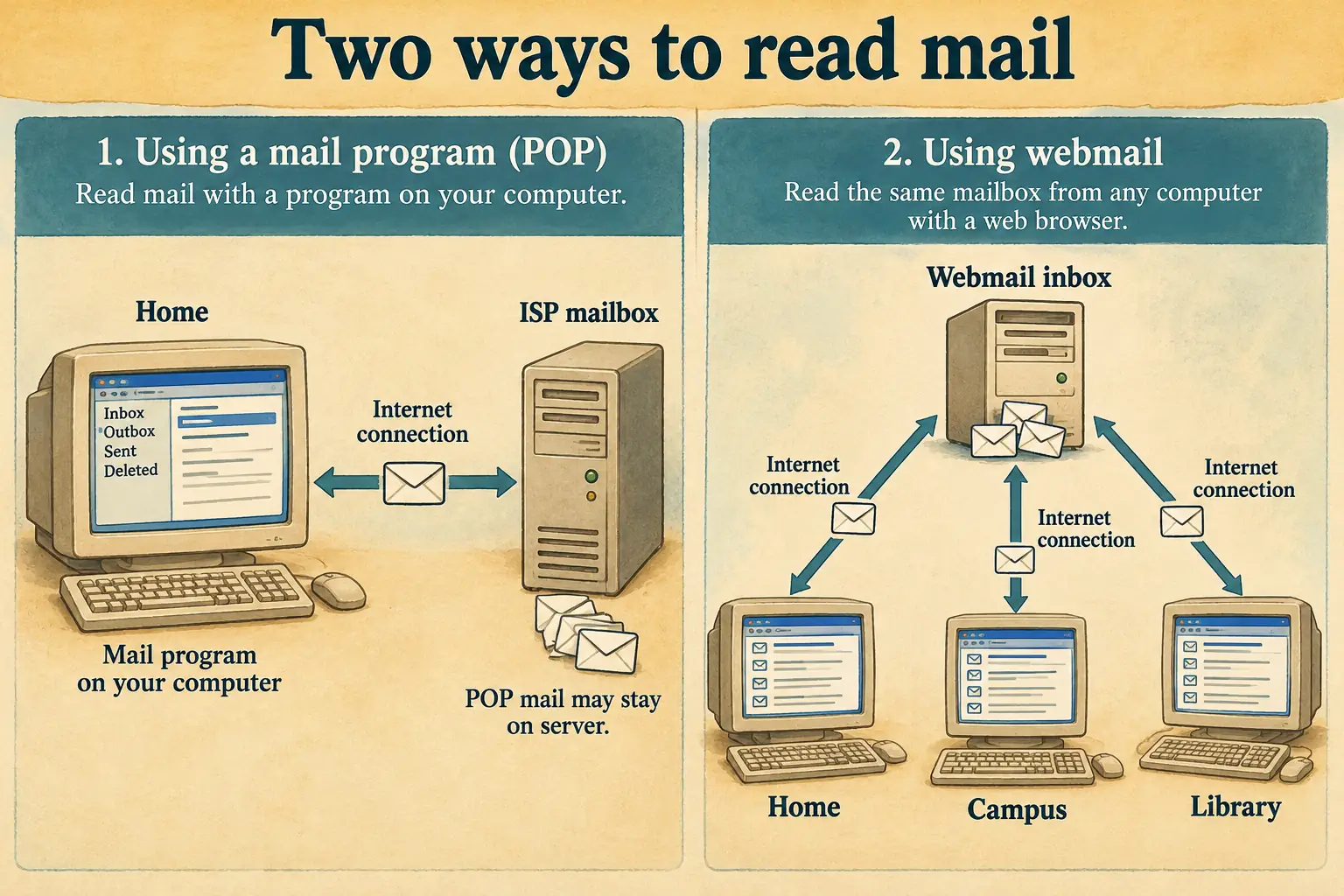
Hotmail’s first announcement made a promise that sounds almost too small to be news today: you could check your email from any computer with a web browser and an Internet connection. No mail program to install. No special computer to return to. No new address just because you changed Internet providers.
In July 1996, that was a startling offer. A message from a friend did not have to wait on the machine where you usually collected your mail. Your address could belong to you, rather than to your workplace or the company that got you online.
Best of all, the mailbox itself was free. The connection to reach it usually wasn’t.
That difference explains both the appeal of Hotmail and the bargain millions of people were about to make.
When Email Had an Address and a Home
By the mid-1990s, plenty of people already used email. Students had campus accounts. Office workers used company systems. Home users received mailboxes with Internet service from providers such as EarthLink, or through online services such as AOL and CompuServe.
There was a catch: your email identity was often tied to the organization providing it. Leave the company or switch providers, and you might need to tell everyone your new address. Some mail lived on a company server; some was downloaded to one PC by a program set up with the right server names and passwords. The exact arrangement varied.
For many home users, collecting email was a little ritual. Start the computer. Connect through the modem. Open the mail program. Wait while new messages arrived. If the program saved copies on that PC, those copies stayed there unless you took steps to move them.
Now consider a person visiting relatives, changing jobs, or using a campus computer lab. A working Internet connection might be right in front of them, yet their own mail program and familiar settings were somewhere else. They could reach the Web, but not easily reach their personal inbox.
Hotmail attacked that mismatch.
What Hotmail Actually Offered in 1996
We do not have to guess at the original promise. A dated Hotmail company announcement survives in the NET-HAPPENINGS mailing-list archive. It is dated July 4, 1996, and appeared in a digest circulated a few days later. It says the service was available that day.
The company, founded by Sabeer Bhatia and Jack Smith, was then based in Fremont, California. It spelled its name HoTMaiL, drawing attention to the letters HTML, the language used to make web pages.
To get started, a visitor needed a computer with web access and a browser. They registered for an address ending in @hotmail.com. Then they could use that address to send and receive messages through the site, without setting up a separate desktop email program.
The launch announcement also described features that are easy to overlook:
- Folders to organize and find messages.
- An address book to keep contacts.
- Custom mailing lists for sending mail to a group.
- Personal signatures added to outgoing messages.
- POP mail retrieval to bring messages from an existing email account into the browser.
POP means Post Office Protocol. In plain English, Hotmail could collect mail from another provider’s mailbox, once you supplied the necessary account settings. That mattered if you had already printed your old email address on business cards or handed it out to friends. You did not have to abandon that address on day one.
This was a company announcement, not an independent test of every feature under heavy use. It does, however, settle an important historical question: launch-day Hotmail was pitched as more than a single, bare inbox.
The 1996 Document Worth Reading
The launch notice lists folders, mailing lists, address books, signatures, and POP retrieval under its original offer. It also says that browser access to the World Wide Web is the system requirement. The notice calls Hotmail the world’s first free web-based email service; that is the company’s claim, not proof that nobody had tried webmail before.
One Inbox, Different Desks
The genius of the idea was not that email itself became new. It was that its usual home moved.
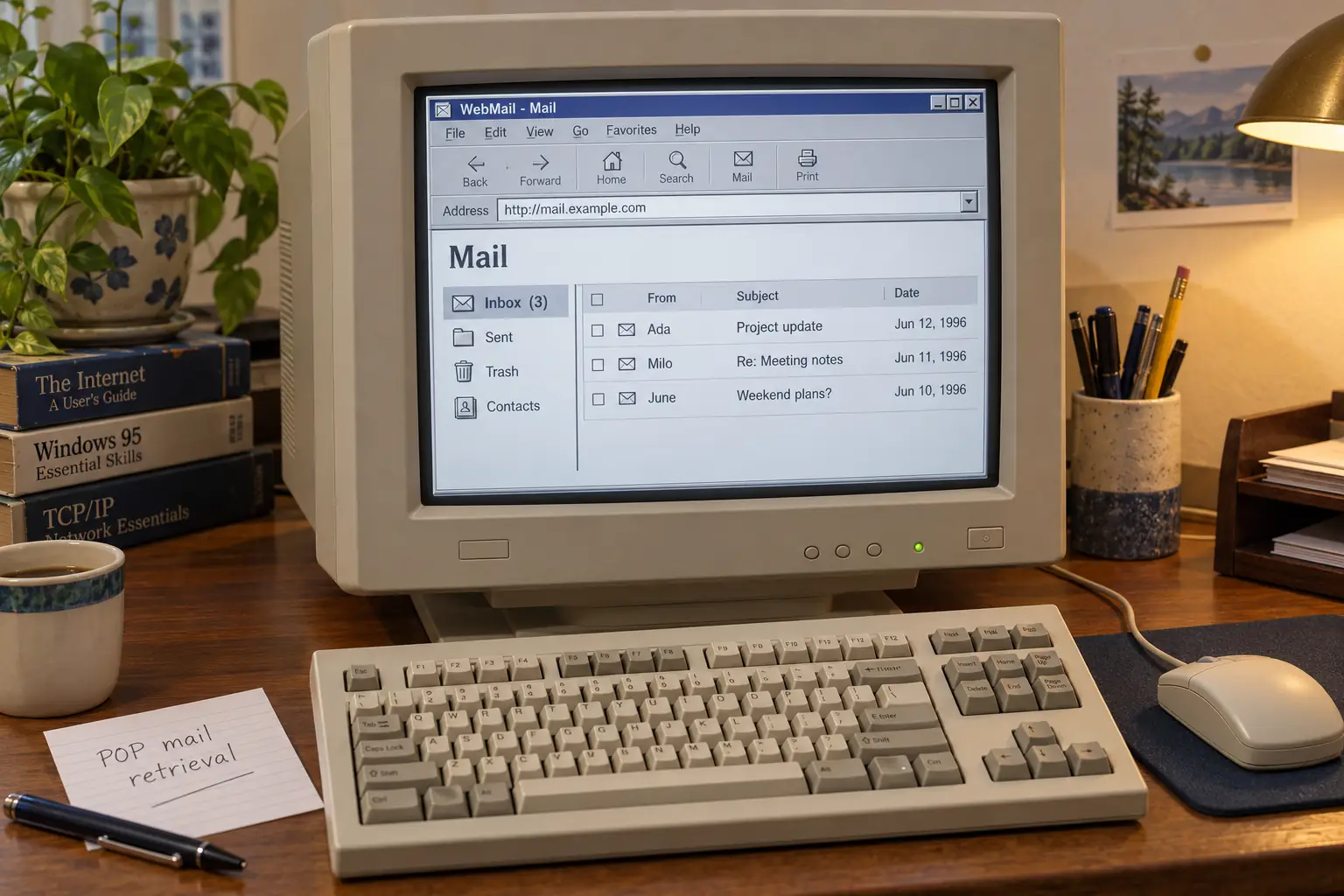
Suppose you had a Hotmail account in 1997 and access to the Web at a library, at school, or on a friend’s PC. You could visit the same site, sign in, read a message, write a reply, and return another day from a different machine. You did not need the address book or the inbox to be copied onto every computer.
That could feel like real independence. A student going home for the holidays no longer had to rely only on a campus mailbox. A worker could keep private correspondence separate from a company address. Someone changing Internet providers could give out one address and keep it.
In its December 1997 acquisition announcement, Microsoft emphasized this very point: a Hotmail address could outlast a change of provider, employer, or country. By then the service also offered attachments, filtering, spell-checking, and other functions. Those are documented for late 1997; we should not quietly move every one of them back to launch day.
Access still took effort. At home, many people dialed an Internet provider over a telephone line. At a shared machine, they had to wait for a free terminal and use whatever browser was installed. Slow connections made large pages and attachments a test of patience.
And the word anywhere had limits. You needed a usable connection, a compatible browser, and permission to use the computer. A free Hotmail account did not buy Internet access, pay the phone bill, or turn every library into a round-the-clock computer room.

Remember the Sign-Out Habit?
With a home mail program, the computer often felt like your own space. A public webmail session was different. You had to finish, sign out, and leave the next person an empty browser—not your messages. The need was easy to understand, even if the habits took time to catch up.
Free Email, Paid For Somewhere Else
Hotmail made a daring business promise: it would not charge members for the basic mailbox. Instead, advertising would support the service. The advertisements were not an afterthought; they were the business model.
A WIRED report from April 1997 found banner ads sitting above users’ messages. It also noted the catch in the word free. A service such as Hotmail still required Internet access, which many people paid for separately. The rival Juno offered another route: special software and a dial-up connection to its own system.
Other companies saw the appeal. Juno offered free email by a different method. RocketMail, later part of Yahoo Mail, and services linked to search and portal sites added more choices. Some earlier systems had also allowed mail to be viewed through the Web. Hotmail was an early, highly visible success, not the inventor of all web-based mail.
Free services also asked users to accept advertisements and hand over information at sign-up. This was not unique to Hotmail. A 1998 Washington Post report examined how companies in this market gathered personal details to help target ads. Giving up part of your attention, and sometimes data about yourself, was part of the bargain.
A Tiny Line at the Bottom of Every Message
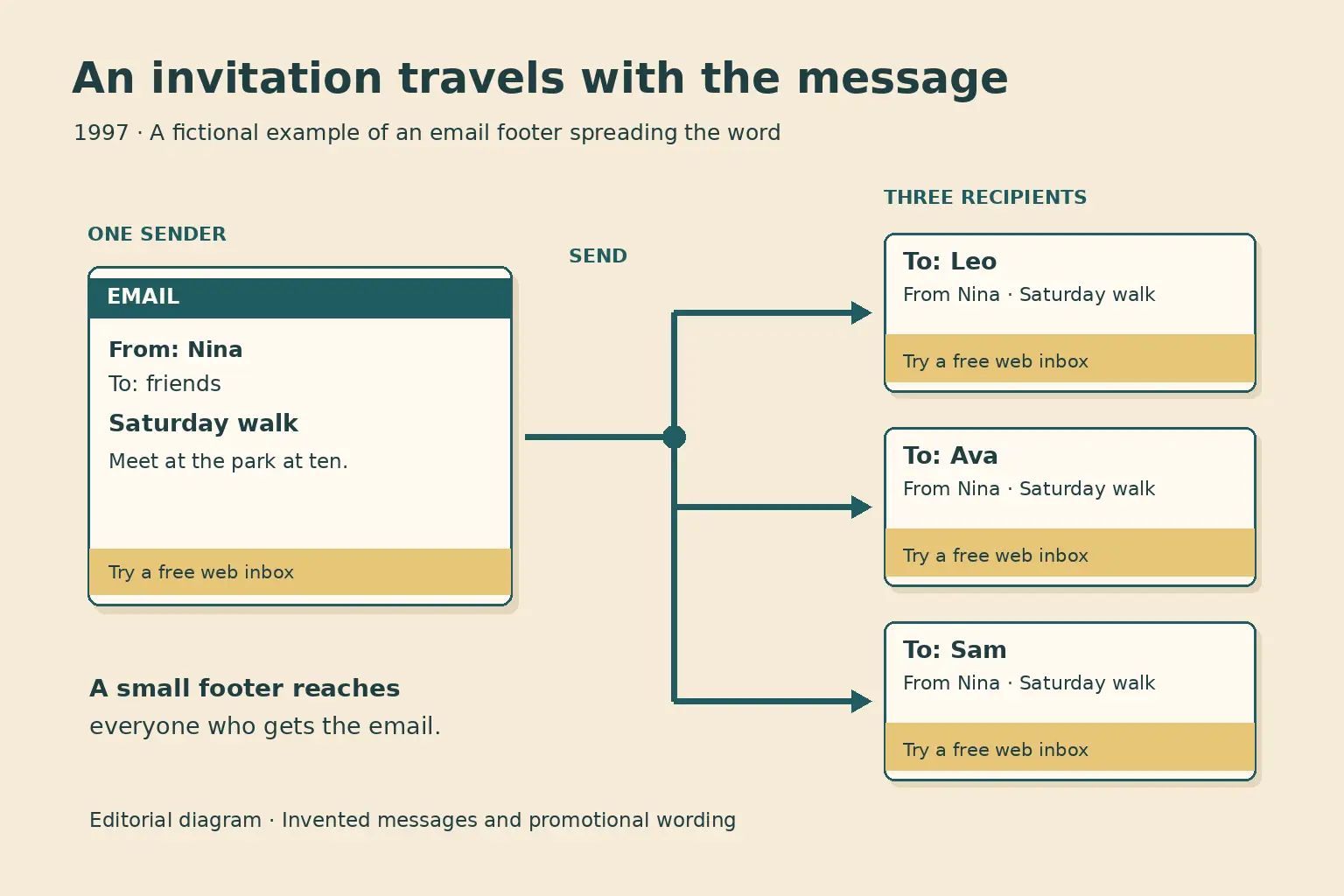
Hotmail did not grow only because people saw an advertisement on a website. It carried its own invitation into other people’s mailboxes.
Outgoing messages included a short line inviting the reader to get a free Hotmail account. Every letter to a friend could become a demonstration. A recipient knew the sender already used the service, and the next step was only a browser visit away.
There is an interesting disagreement over who deserves credit. In Jessica Livingston’s interview with Bhatia, published in Founders at Work, Bhatia credits Jack Smith with the idea for the signature line. Investor Tim Draper, in his later account, recalls pushing for a promotional message and meeting resistance from the founders. The accounts differ on the origin. Both help explain why adding advertising to a personal message was a sensitive choice.
The practice worked as promotion. In April 1997, WIRED reported Hotmail had reached three million subscribers. By December 31 of that year, Microsoft’s own announcement described more than nine million worldwide members.
The numbers deserve a little care. A registered account is not always a different person. People could hold several addresses, keep one as a backup, or stop using an old account. Even in 1997, reporters were warning that sign-up totals and daily active users were not the same thing.
Microsoft announced its acquisition on December 31, 1997, saying it would make Hotmail part of its MSN services. Microsoft did not disclose the terms in that announcement. Later reporting commonly put the deal at roughly $400 million, but the reliable contemporary public statement is the acquisition itself and Hotmail’s reported membership.
By December 1998, Microsoft claimed more than 30 million active accounts, with over half of its members outside the United States. That was a striking international reach for a service started in California only two years earlier.
Your Mail Was With You. It Was Also With Them.
There was a deeper tradeoff beneath the convenience.
In a common older setup, copies of your messages could sit on your computer or a server managed by your school, employer, or provider. With Hotmail, the central service stored your mailbox so you could see it from another PC. That solved the portability problem, but it also meant depending on the company running those servers.
If the service went down, your portable inbox could be unreachable everywhere. In April 1997, WIRED interviewed customers who complained of outages, junk mail, and even lost stored messages. Hotmail acknowledged that it had struggled with reliability as membership climbed.
Privacy had two layers. On a shared computer, someone could watch you type or find a session you forgot to close. At the service level, you had to trust the operator to guard the mail it kept for you. Those are different risks, and neither disappeared because a site asked for a password.
In August 1999, that trust took a serious hit. A flaw allowed outsiders to enter other people’s Hotmail accounts without knowing their normal passwords. WIRED’s reporting at the time described the issue, the widespread exposure it created, and Microsoft’s response. Microsoft said it had fixed the problem and disputed claims that it had intentionally built a backdoor.
That breach happened three years after the launch, under Microsoft ownership. It is not evidence that every 1996 account was compromised. It is evidence of a larger lesson: storing private letters online brings a set of risks that follows the mailbox wherever it goes.
There was no simple return to the old arrangement, either. A mailbox kept only on one PC could be lost with a failed disk. A provider-based address could disappear when the subscription ended. Webmail traded those limits for different ones. Which bargain felt better depended on what you needed.
What Happened to the Hotmail Address?
Hotmail kept changing after the 1990s. The name became MSN Hotmail, later appeared with Windows Live branding, and eventually gave way to the Outlook.com service.
That did not mean every old address vanished. In February 2013, Microsoft announced that it would move Hotmail users to Outlook.com while preserving their @hotmail.com addresses, passwords, and contacts. A later Microsoft upgrade guide also told members they could keep using their existing addresses.
As checked in October 2026, the old Hotmail name is no longer the name of Microsoft’s main consumer email interface. Existing Hotmail addresses can still be used with Microsoft’s current mail system, although a particular account must still be active and accessible to its owner. The original 1996 website and its early inbox are not services you can log back into as they were.
The final irony is gentle. Hotmail’s great promise was that you would not need to change your address when the world around you changed. Years later, Microsoft changed the name, the design, the machines behind the service, and much of the business around it. For people who kept their accounts, the old address could stay.
What once felt like a clever way to escape the home computer became the normal expectation: our letters should be waiting for us, wherever we happen to open a screen.
Sources and Further Reading
- Hotmail’s July 1996 announcement — company launch notice preserved in the NET-HAPPENINGS digest; the best period list of advertised first-day features.
- Sabeer Bhatia interview — Jessica Livingston’s Founders at Work chapter, a founder’s later account of the idea and growth.
- WIRED, April 1997 — period reporting on prices, advertising, competing services, outages, and user complaints.
- Microsoft acquisition announcement — late-1997 capabilities, advertised address independence, membership, and deal date.
- Microsoft’s 1998 milestone — company-reported account total and international reach, not an independent audit.
- WIRED’s 1999 security report — contemporary evidence of the account-access flaw and Microsoft’s response.
- Outlook.com transition announcement — Microsoft’s stated plan to move users while keeping their old email addresses.