
In 2010, Bill Atkinson, the man who created HyperCard, was still relying on it at home. His wife had made a set of HyperCard programs to help run his photography business. They tracked gallery stock, equipment costs, and property taxes. The programs worked on an aging Power Mac G5.
Atkinson told interviewers at the Computer History Museum that if the G5 died, they might have to buy two more. It was a funny problem to have: the creator of a once-famous Apple program had become dependent on homemade software that newer Macs could not run easily. His wife had built the tools to fit the job, and the tools had become too useful to lose. Atkinson’s 2010 interview gives us this small but telling scene.
That was HyperCard’s great trick. It did not just let you use a program. It let you make one, often before you thought of yourself as a programmer.
From a filing cabinet to the Mac
HyperCard began with a very old problem: where did I put that piece of paper?
Atkinson had once managed physical files by numbering folders and keeping a small, searchable card record. On the Macintosh, he built a simple electronic address-and-file tool. In a 1994 MacTech account, Apple veteran Chris Espinosa recalled seeing an address book that Atkinson was working on in early 1986. Over the following months, it grew the ability to handle pictures, separate collections of cards, and buttons that jumped between them. Espinosa’s firsthand account traces that growth.
Atkinson had helped make the Macintosh feel different from older computers. His earlier work included QuickDraw, the graphics system behind the Mac’s screen, and MacPaint. But drawing on a computer was one thing. Letting an ordinary user assemble an interactive program was something else.
Apple announced HyperCard at the Boston Macworld Expo on August 11, 1987. It came with new Macintosh computers at no extra charge. Existing owners could buy it for about $49 in the United States. That mattered: the person with an idea did not first need to pay for a professional programming system. The real price of admission was owning a capable Mac.
Behind the Scenes: It was nearly called WildCard
Atkinson recalled that the project was first known as WildCard. In his 2010 interview, he said Apple avoided that name because of a dispute involving an unrelated Apple II product with the same name. He believed Chris Espinosa suggested HyperCard. He also admitted he disliked the word “hyper,” which sounded too much like hype. This is Atkinson’s later account, not a fresh finding about the legal dispute.
What you could actually build
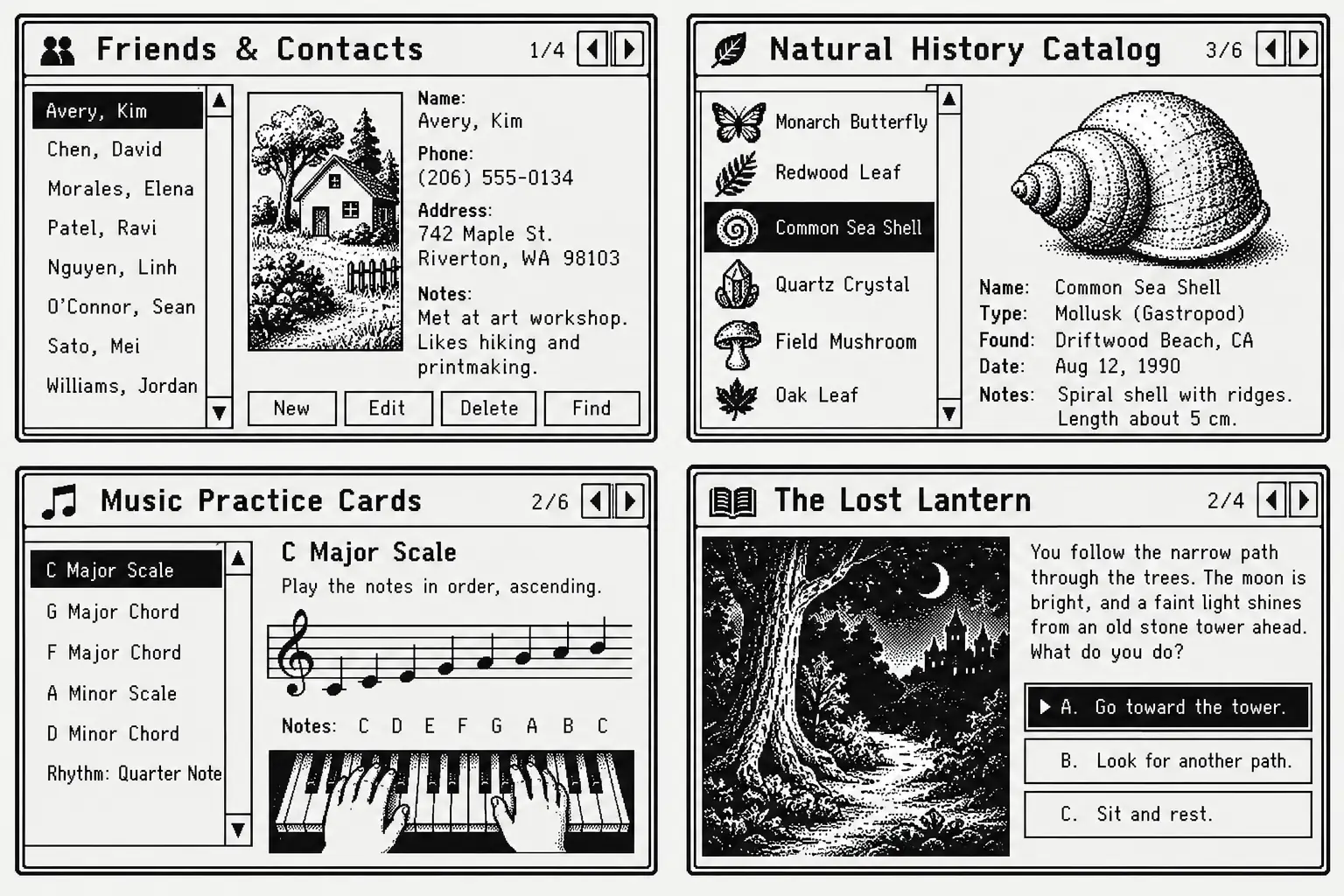
Open HyperCard and you found stacks. A stack was a collection of screen-sized cards, much like a box of index cards that had learned a few tricks. One card might hold a name and phone number. Another might show a photograph. A button could take you straight to a related card.
The 1987 package already included useful examples: addresses, a calendar, a to-do list, and other small tools. You could use them as they stood. More importantly, you could change them.
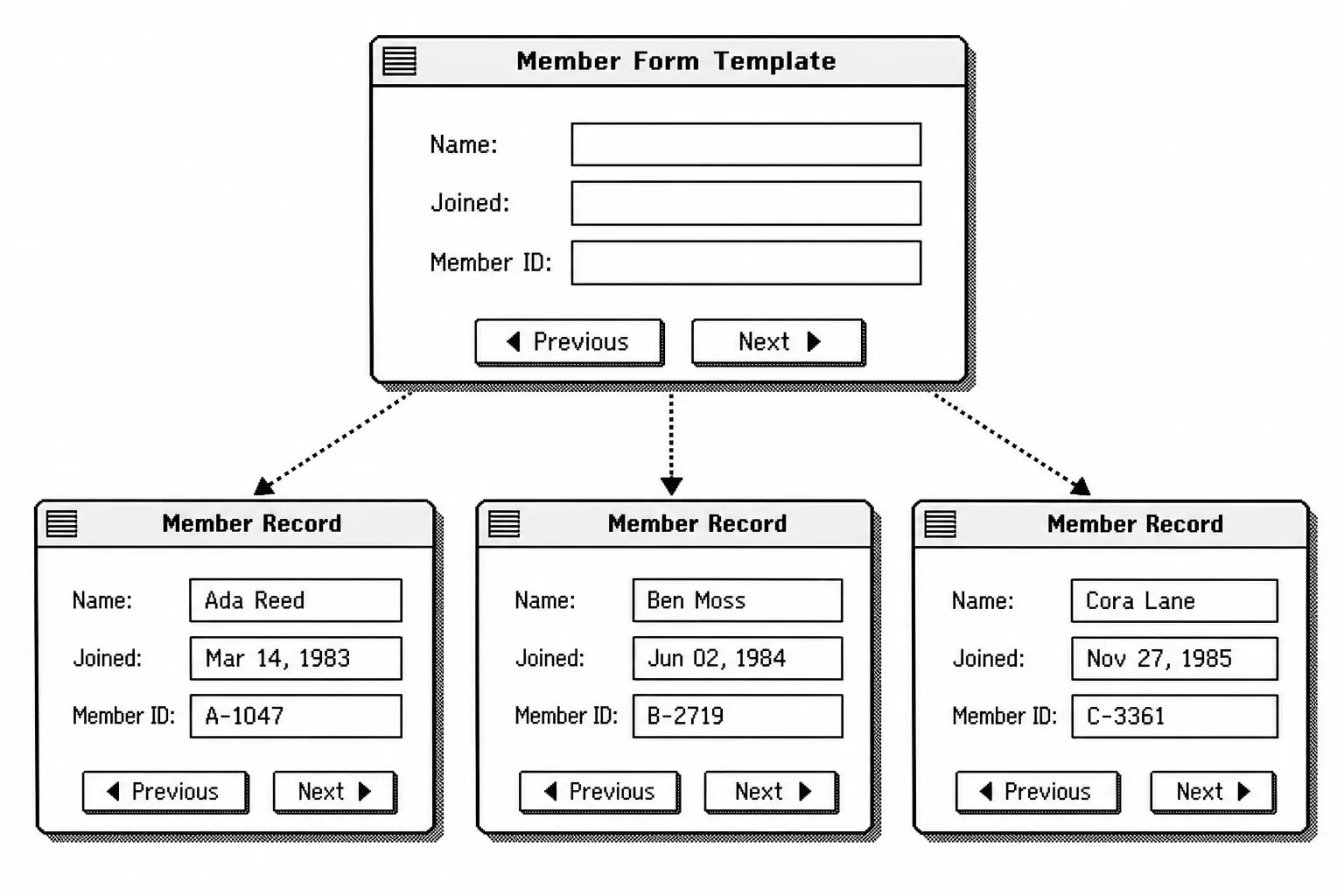
Suppose you ran a small club and needed a member directory. You could create one card per member, with spaces for a name, phone number, and dues paid. You could give every card the same layout, add a button marked “Next,” and build a second card with meeting notes. That is a worked example of what HyperCard supported, not a claim about a specific club.
The shared layout was called a background. You drew labels and made fields on it once, rather than building each new card from scratch. Each card then held its own member’s details. For a person used to rewriting forms on paper, this was a relief.
You could also paint on a card, add a picture, search text across the stack, link to another stack, or print cards. Later versions gained stronger tools for larger projects. The key point was that a stack was both the information and the thing that worked with the information.
A spreadsheet asks you to work in cells. A database often asks you to design tables. HyperCard started with a card you could see and touch. It asked a simpler first question: what should this screen do?
The button that taught you code
Buttons made the difference between a pile of digital cards and a small application. You could create a button with the mouse, place it on the card, and tell it where to go. HyperCard also offered scripts for tasks that needed more than a simple link.
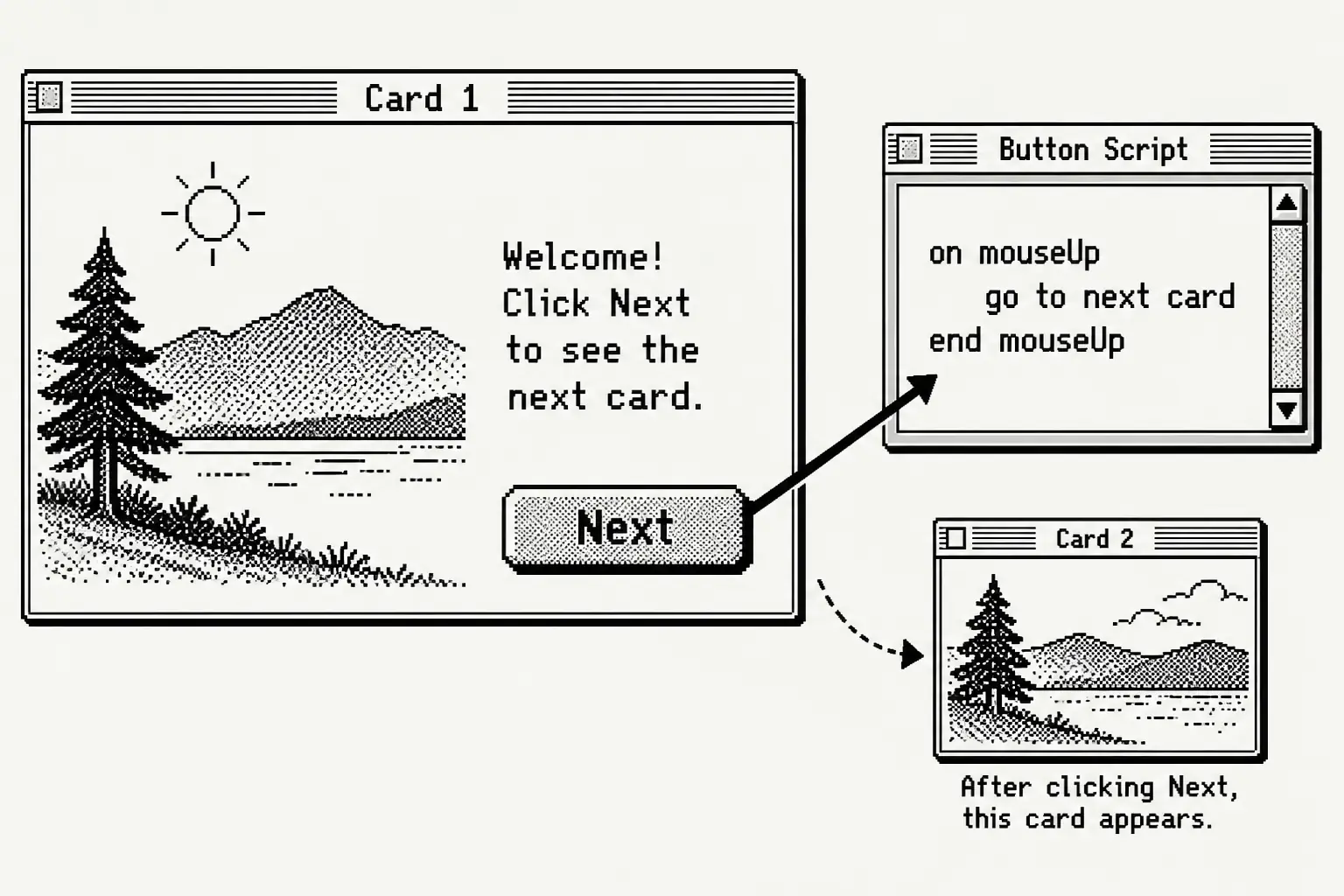
That language was HyperTalk. Atkinson set out its English-like approach, and Dan Winkler implemented it. A small script for a button could look like this:
on mouseUp
  go to next card
end mouseUp
In plain English: when someone releases the mouse button after clicking, show the next card. This is an illustrative HyperTalk example, not a quotation from an original stack.
That may not sound exciting today. In 1987, though, a beginner could open a button, read what it did, and try changing it. The computer was no longer a sealed box full of somebody else’s decisions.
Atkinson demonstrated that openness during his 2010 interview. He opened the script of an existing button and showed how one destination could be changed to another. It was a way to learn by taking apart a working example.
Not everything was easy. A polished stack still took thought. Good search tools, careful layouts, and reliable scripts required practice. More complex work could depend on extra commands or other software. HyperCard lowered the first step into programming; it did not make every hard problem disappear.
A useful distinction
HyperCard let people inspect many ordinary stack scripts, but that did not make every stack open-source software in the modern licensing sense. Authors could also protect or limit access to their work.
A thousand possible uses, not one killer app
In August 1987, technology writer Lawrence Magid tried HyperCard for the Los Angeles Times. Within a couple of days, he had changed a supplied stack into a personal information tool with a memo pad, phone dialer, and address book. He wrote that the hardest part was deciding what features he wanted, then deciding when to stop adding them. His contemporary review is a fine guide to HyperCard’s appeal.
That was the magic and the danger. Once you had learned to add one more button, why not another? A five-minute job could turn into a weekend of making the tool just right.
HyperCard supported small personal lists, office forms, teaching materials, interactive reference works, and much stranger creations. Its files could travel on floppy disks and later other storage media. Users shared and sold collections known as stackware. With enough skill, the same system could support projects far larger than a phone book.
The Library of Congress documents an unusual example: the papers of scientist Nina V. Fedoroff include HyperCard files about corn genetics, known as Hypermaize cards. This is a reminder that the program did not belong only to hobbyists playing with buttons. Experts could use its simple screens to organize specialized knowledge. The Library also records early HyperCard-based editions of its American Memory materials.
The unexpected road to Myst
HyperCard also helped create a world of clickable stories. Brothers Rand and Robyn Miller used it at Cyan to build early interactive works, including The Manhole. Robyn later described how drawing a manhole led to a choice: should the story go up a vine or down? A sequence of pages was turning into a world you could explore.
Their 1993 game Myst grew from that way of making interactive scenes. A 1994 Wired report described the game’s creation using a heavily worked HyperCard stack. This does not mean every edition of Myst on every platform was simply a normal HyperCard document. The work relied on a much more demanding mix of art and technology.
And Myst was not proof that everyone needed to make a game. It showed just how far a tool built around cards and links could stretch when skilled people pushed it.
Was HyperCard the Web before the Web?
It is tempting to call HyperCard the Web’s forgotten parent. Both let people follow links from one piece of information to another. Both rewarded curiosity. Click here; see where it takes you.
But the difference is too important to lose.
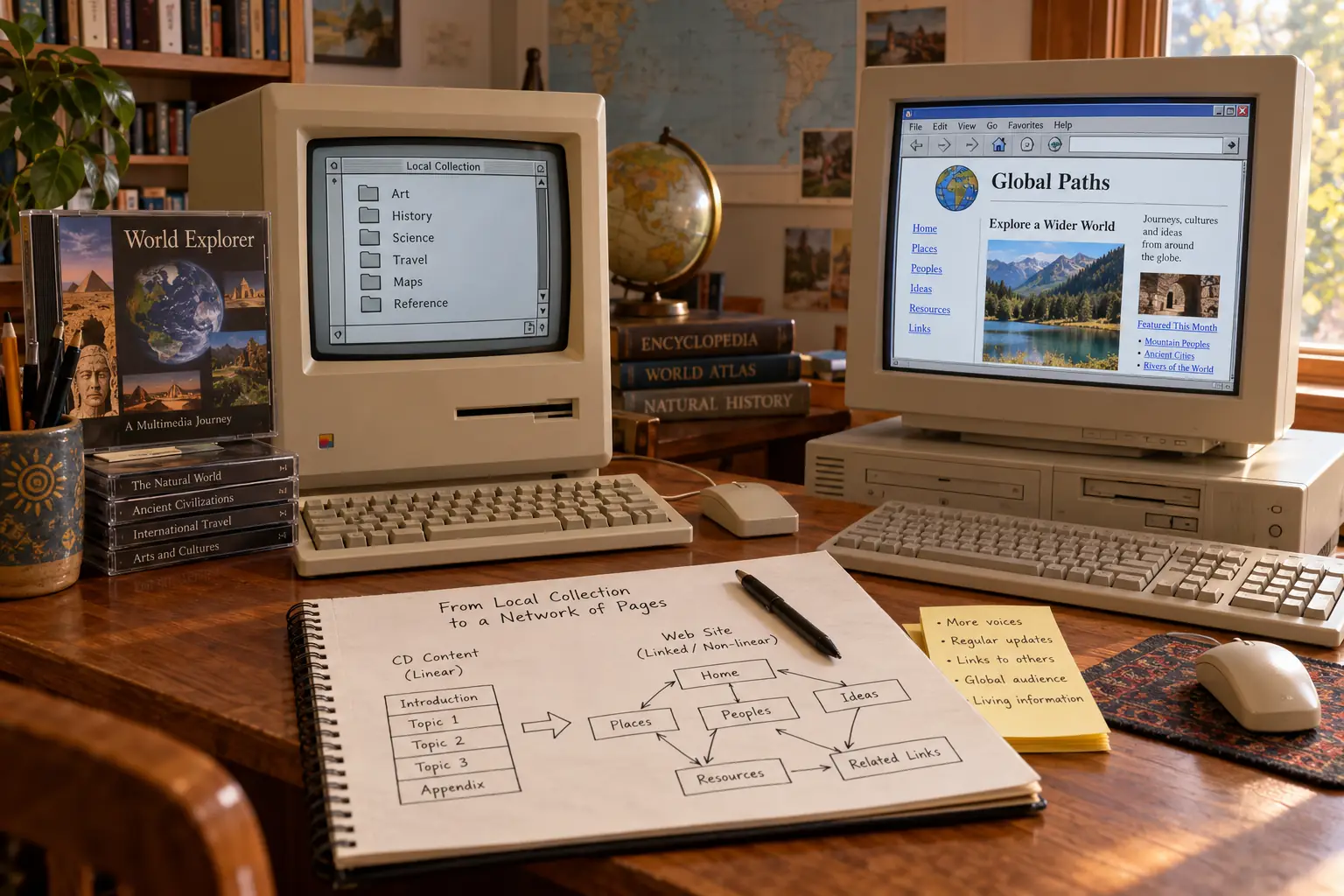
HyperCard stacks normally lived on a local Macintosh or on media shared between computers. The World Wide Web was designed to connect documents across a network, using common addresses and standards so different machines could take part. A HyperCard button and a Web link might feel alike, but the systems underneath were different.
Hypertext was older than HyperCard, too. Researchers had spent decades working on linked information. Tim Berners-Lee had built his own linked-notes program, ENQUIRE, in 1980. At CERN, he developed the first Web server and browser in 1990. The CERN history of the Web places that work in its own setting.
HyperCard belongs in this story as a striking, popular example of hypertext for personal computers, not as the sole invention that became the Web. The less tidy truth is more interesting: many people were trying to make information feel connected, and HyperCard made that idea something ordinary Mac owners could build themselves.
Legend vs. the Record: “HyperCard invented hyperlinks”
The legend: HyperCard invented clickable links and the Web copied them.
What the record shows: Linked information systems came earlier, and the Web needed network standards that HyperCard did not supply. HyperCard’s special achievement was bringing visual, editable linked documents to a wide Mac audience.
Why such a good idea lost its home
There was no single day when HyperCard suddenly stopped being useful. Instead, its place inside Apple and inside computing changed.
The original free distribution helped people try it. But it also made the business difficult to define. Was HyperCard a simple Mac accessory, a programming tool, or a product that should pay for its own development?
In 1990, responsibility for HyperCard moved to Apple’s software company Claris. The improved HyperCard 2.0 brought stronger tools, while the complete authoring package became a commercial product. A version continued to ship with Macs, but the split between ordinary use and full authoring became harder to explain. At the time, TidBITS reported confusion about what free users would be able to do. That confusion was part of a larger problem: Apple never settled on one clear way to present HyperCard.
Some limits came from technology itself. The program began in the black-and-white world of the classic Mac. Color and rich media became more important, and newer authoring tools competed for attention. The Web offered something different: a way to publish linked pages to people on many kinds of computers.
Apple released HyperCard 2.4.1 in July 1998. It fixed practical issues, including problems with very large drives. It did not start a new chapter. Apple never shipped a native Mac OS X version.
When Mac OS X arrived in 2001, HyperCard users were worried. The International HyperCard Users Group campaigned for an update. In a March 2001 Macworld report, supporters described uses ranging from garden records to commercial aircraft maintenance. Those examples were claims made by the user group, not an independent count of installations. They still show how much people stood to lose.
HyperCard could run for a time through the Classic environment on compatible older versions of Mac OS X. But it was living on borrowed time. Contemporary reports say Apple removed it from its website in March 2004, years after the last update.
What went wrong?
Unclear identity: A program that was part database, part authoring tool, and part programming language was hard for Apple to explain and price.
Changing expectations: Users wanted richer media and cross-platform sharing. HyperCard’s Macintosh roots made those shifts costly.
No native OS X future: Apple chose not to carry HyperCard forward as a modern Mac application. That left useful stacks tied to older systems.
These were overlapping pressures, not proof that one rival or one executive “killed” the program.
Can you still use HyperCard today?
Yes, with limits. HyperCard is discontinued and does not run as a normal modern macOS app. If you want to explore it, classic Macintosh emulation is the more practical route than trying to install it directly on a current Mac.
The Infinite Mac project lets visitors run many old Mac systems inside a browser. Availability of a particular HyperCard version or stack can vary by machine. The Library of Congress format guide also points to HyperCard stack collections and preservation tools.
Opening an old stack is not always the same as restoring the program it once ran. Some stacks need special commands, sounds, external files, or devices that are no longer present. Some are password-protected. If a stack contains important records, preserve an untouched copy and try to export its text and images before experimenting.
For new projects, visual app builders, simple databases, and modern scripting tools now cover many of HyperCard’s old jobs. They are not exact replacements. HyperCard’s unusual pleasure came from having your information, the screen design, and the program’s behavior together in one thing you could open and change.
The program somebody in your house could improve
What made HyperCard memorable was not its black-and-white buttons. It was the permission those buttons seemed to give.
If a tool did not fit your job, you could fix the tool. If your records needed one more field, you could add it. If a button took you to the wrong place, you could look inside and learn why. The line between using software and making software became a little less firm.
That is why Atkinson’s family business makes such a good ending to the story. The program had long stopped moving forward. The old G5 had become a worry. Yet the custom stacks still knew exactly how that business worked. They had been made for the people who used them, not the other way around.
Sources and further reading
- Computer History Museum, Atkinson and Hertzfeld interview (recorded 2010) — firsthand accounts of the origins, naming, scripting, and long afterlife.
- Chris Espinosa, “The Importance of Hypercard” (MacTech, 1994) — early address-book prototype and design history.
- Apple, HyperCard User’s Guide (1987) — original card, stack, linking, and authoring instructions.
- Lawrence J. Magid, 1987 HyperCard review — a contemporary hands-on account and original pricing.
- Wired, “Guerrillas in the Myst” (1994) — period reporting on Cyan and its HyperCard-based creative work.
- TidBITS, “Claris HyperCard 2.0” (1990) — contemporary concerns about distribution and authoring.
- AppleCare technical note, HyperCard 2.4.1 (1998 archive) — version and update timing.
- Macworld, 2001 user-group campaign — evidence of concern as Mac OS X arrived.
- Library of Congress, HyperCard Stack File Format — historic uses, technical limits, and preservation.
- CERN, A Short History of the Web — context for the distinct origins of the networked Web.